
Products / Property Mileage Log
Log each trip to a rental, and the miles and totals work themselves out.
Type the date, property, purpose and both odometer readings for each trip. Miles, rate and amount are worked out, with totals for each month and each property.
Who it's for
Landlords who drive to their rentals for inspections, repairs and showings and want a dated record of each trip.
The rate cell starts blank. Rates change and vary by purpose, so you type the one you use and check the current figure yourself.
The Schedule E Rent Ledger (US$9.99 at launch) is the larger file, for rent records by property.
A look at the actual file
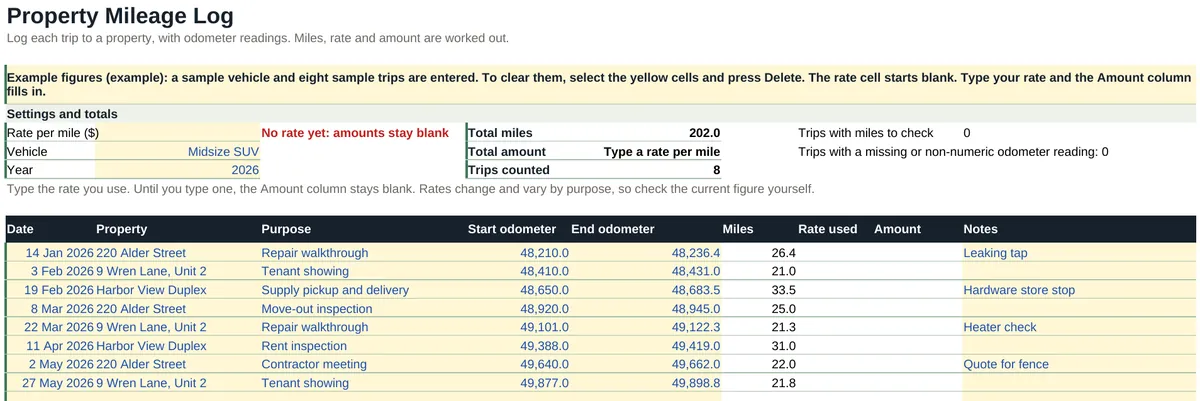
What's inside
Two tabs: Start here, and one working tab called Mileage log, in four blocks.
| Tab and block | What it does |
|---|---|
| Start here | Five setup steps, a color key and a guide to the working tab. |
| Mileage log: Settings and totals | Rate per mile, Vehicle and Year, with Total miles, Total amount and Trips counted at the top, and a count of any trips with negative miles. |
| Mileage log: Trip log | 60 rows with Date, Property, Purpose, Start odometer, End odometer, Miles, Rate used, Amount and Notes. |
| Mileage log: Totals by month | Trips, Miles and Amount for each month of the year you set, with a year total. |
| Mileage log: By property | Trips, Miles and Amount for each property name you type, with a total. |
A look at the file
| Date | Property | Purpose | Start odometer | End odometer | Miles |
|---|---|---|---|---|---|
| 14 Jan 2026 | 220 Alder Street | Repair walkthrough | 48,210 | 48,236.4 | 26.4 |
| 3 Feb 2026 | 9 Wren Lane, Unit 2 | Tenant showing | 48,410 | 48,431 | 21.0 |
| 19 Feb 2026 | Harbor View Duplex | Supply pickup and delivery | 48,650 | 48,683.5 | 33.5 |
| 8 Mar 2026 | 220 Alder Street | Move-out inspection | 48,920 | 48,945 | 25.0 |
| 22 Mar 2026 | 9 Wren Lane, Unit 2 | Repair walkthrough | 49,101 | 49,122.3 | 21.3 |
| 11 Apr 2026 | Harbor View Duplex | Rent inspection | 49,388 | 49,419 | 31.0 |
| 2 May 2026 | 220 Alder Street | Contractor meeting | 49,640 | 49,662 | 22.0 |
| 27 May 2026 | 9 Wren Lane, Unit 2 | Tenant showing | 49,877 | 49,898.8 | 21.8 |
Miles is the end odometer less the start odometer. The file ships with the Rate per mile cell blank, so Rate used and Amount stay at zero until you type the rate you use.
| Property | Trips | Miles |
|---|---|---|
| 220 Alder Street | 3 | 73.4 |
| 9 Wren Lane, Unit 2 | 3 | 64.1 |
| Harbor View Duplex | 2 | 64.5 |
| Listed properties total | 8 | 202.0 |
Format
- File
- 1 Excel workbook (.xlsx), 2 tabs
- Software
- Microsoft Excel. Designed to open in Google Sheets.
- Limits
- 60 trips and 8 properties in the By property table. The sample trips are marked (example) and clear in one step.
- Delivery
- Instant download after purchase. Nothing is shipped.
- Price
- US$3.99, one-time. No subscription.
What it does not do
- It does not know any mileage rate. The rate cell starts blank: type the rate you use and check the current figure yourself.
- It does not say which trips qualify for anything, and it gives no tax advice.
- It does not read your phone or your car. You type the odometer readings.
Questions
Which version of Excel do I need?
Excel 2010 or later on Windows, Excel 2016 or later on Mac, or Excel for the web. We checked every formula in this workbook against the version of Excel that first supported it: the newest thing it uses arrived in Excel 2007, so it needs no Microsoft 365 subscription. There is nothing in it that only newer Excel can run, such as XLOOKUP, LET, IFS or TEXTJOIN, and there are no macros or add-ons. Excel 2003 and earlier are not supported.
The totals look blank when I open it. What is wrong?
Nothing. Excel opens a downloaded file in Protected View and does not calculate until you click Enable Editing. The figures appear as soon as you do.
Does it work on a Mac?
Yes, in Excel for Mac. There are no macros, so nothing in the file is Windows-only. It is also designed to open in Google Sheets in a browser.
Can I use it in Google Sheets?
The workbook is made in Excel and designed to open in Google Sheets: upload it to Drive and open it with Google Sheets. It uses no macros, scripts or add-ons. If something does not work as described there, email hello@goodcolumns.com and we fix it or refund you.
Which mileage rate does it use?
None. The Rate per mile cell starts blank. Type the rate you use and check the current figure yourself, because rates change and can differ by purpose.
What if I want a refund?
No change-of-mind refunds on digital files. If a file is faulty or not as described, email hello@goodcolumns.com within 30 days and we fix it or refund you.
Is this tax, legal or financial advice?
No. It multiplies the miles you log by the rate you type. It does not say which trips qualify for anything. Ask your tax preparer how your mileage is treated.
The small print
Good Columns templates help you organise records. They are not tax, legal, accounting or financial advice, are not endorsed by the IRS or any government body, and may not suit your situation. You are responsible for the figures you enter.
The mileage rate cell starts blank. Rates change and vary by purpose, so check the current figure yourself.
Licence: use within your own business; no resale or redistribution.
No change-of-mind refunds on digital files. If a file is faulty or not as described, we fix it or refund you.
Full terms: Terms and refunds.