
Products / Schedule E Rent Ledger
Your rent and expenses, sorted the way Schedule E lists them.
Log rent as it arrives and expenses as you pay them. At year end, print one summary per property for your tax preparer, with the receipt links behind it.
Have a property manager? Key in each monthly owner statement here (rent collected, management fee, repairs, reserves, net payout) so every property and every manager uses the same categories, sorted under the Schedule E line labels.
Who it's for
Landlords with 1 to 10 units who keep their own records and hand them to a tax preparer each year.
It is a record-keeping file. It sorts your figures into Schedule E lines; it does not decide how anything should be reported.
A look at the actual file
What's inside
One workbook, 12 tabs, in this order.
| Tab | What it does |
|---|---|
| Start here | Five setup steps from first entry to year end, the checks status, the colour key and how to clear the example data. |
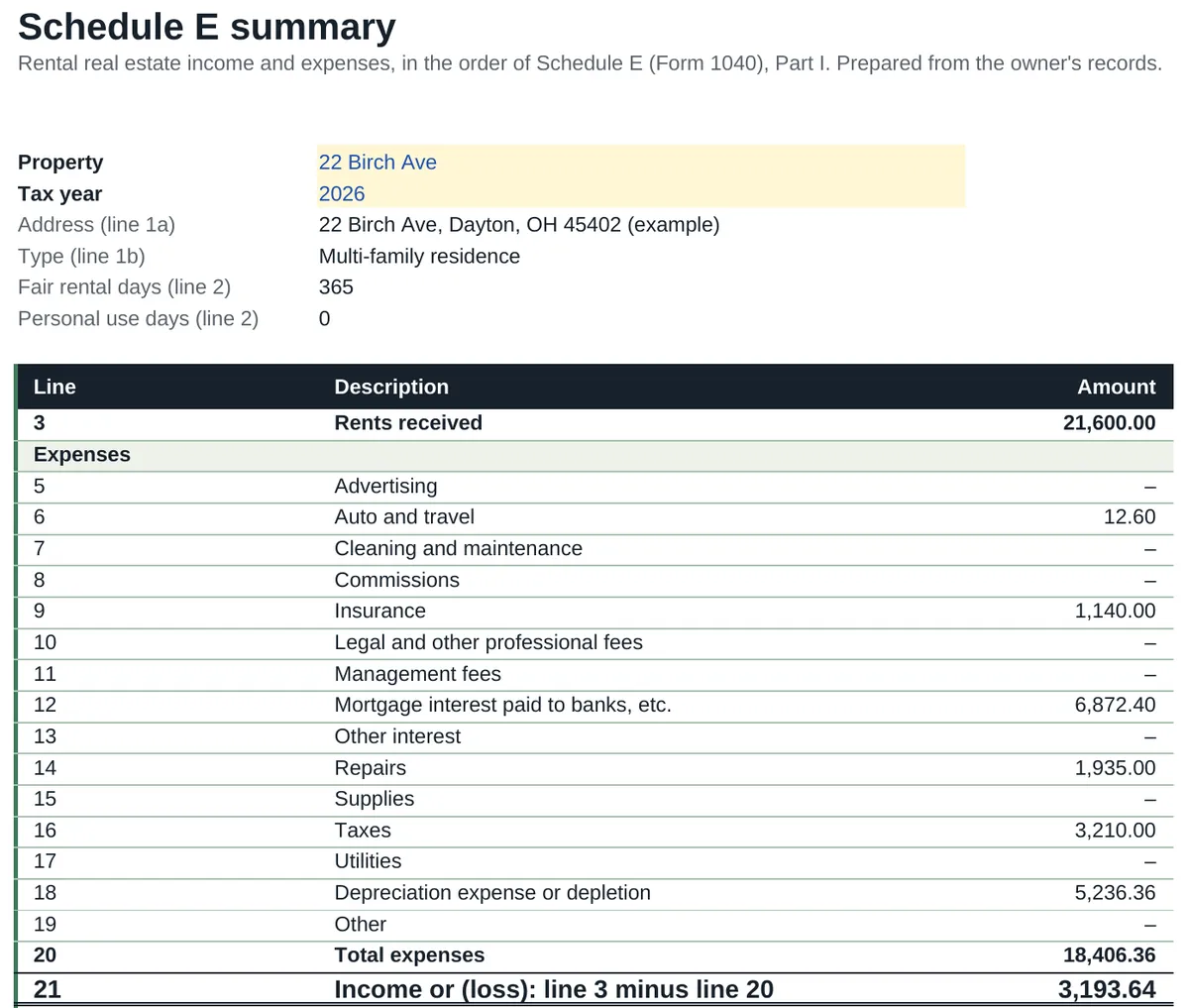
| Schedule E | One property and tax year, lines 3 to 22 in the order of the form. Prints on one page. |
| All properties | Every property side by side for the year, with a total column. |
| Rent ledger | Each unit by month: Paid, Late, Short, Unpaid or Vacant, with the amount and date received. |
| Rent payments | One row each time rent arrives. Up to 800 payments. |
| Expense log | One row per expense with its Schedule E category and a receipt link. Up to 1,000 expenses. |
| Mileage | One row per trip: odometer or miles, purpose and property. Up to 500 trips, with the rate you set for the year. |
| Receipts | Every expense for that property and year with its receipt link, to print behind the summary. |
| Deposits | Security deposits held, where, and what was returned. |
| Units | Tenant, monthly rent, due day and grace days for each unit, with rent changes and vacancy. |
| Properties | Each property's short name, address and type, plus the depreciation figure your accountant gives you. |
| Checks | Names each problem, how many rows have it and the first row to look at. |
A look at the file
| Line | Description | Amount |
|---|---|---|
| 3 | Rents received | 21,600.00 |
| Expenses | ||
| 5 | Advertising | – |
| 6 | Auto and travel | – |
| 7 | Cleaning and maintenance | – |
| 8 | Commissions | – |
| 9 | Insurance | 1,140.00 |
| 10 | Legal and other professional fees | – |
| 11 | Management fees | – |
| 12 | Mortgage interest paid to banks, etc. | 6,872.40 |
| 13 | Other interest | – |
| 14 | Repairs | 1,935.00 |
| 15 | Supplies | – |
| 16 | Taxes | 3,210.00 |
| 17 | Utilities | – |
| 18 | Depreciation expense or depletion | 5,236.36 |
| 19 | Other | – |
| 20 | Total expenses | 18,393.76 |
| 21 | Income or (loss): line 3 minus line 20 | 3,206.24 |
Rent from two units, an insurance premium, nine months of mortgage interest, three repairs and two property tax bills, each logged once on the Expense log. Line 18 is the figure the accountant supplied; the file does not calculate depreciation.
| Unit | Jan | Feb | Mar | Apr | May | Jun | Jul | Aug | Sep | Oct |
|---|---|---|---|---|---|---|---|---|---|---|
| 22 Birch Ave - A | Paid | Paid | Late | Paid | Paid | Paid | Paid | Paid | Paid | Paid |
| 22 Birch Ave - B | Paid | Paid | Paid | Paid | Paid | Paid | Paid | Paid | Short | Unpaid |
| 7 Wren Ln | Paid | Paid | Paid | Paid | Paid | Late | Paid | Paid | Paid | Paid |
Unit B paid 800.00 of 1,100.00 in September and nothing yet for October, so both months are marked in red.
Format
- File
- 1 Excel workbook (.xlsx), 12 tabs
- Software
- Microsoft Excel. Designed to open in Google Sheets.
- Limits
- 10 properties, 10 units, 800 rent payments, 1,000 expenses, 30 deposits.
- Delivery
- Instant download after purchase. Nothing is shipped.
- Price
- US$9.99, one-time. Launch price until 15 Nov, then US$14.99. No subscription.
What it does not do
- It gives no tax advice and does not calculate depreciation: you type the figure your accountant gives you.
- Line numbers are copied from the public IRS Schedule E (Form 1040), Part I. Compare them with the current year's form.
- No bank connection. You type or paste each payment and expense.
Questions
Which version of Excel do I need?
Excel 2010 or later on Windows, Excel 2016 or later on Mac, or Excel for the web. We checked every formula in this workbook against the version of Excel that first supported it: the newest thing it uses arrived in Excel 2007, so it needs no Microsoft 365 subscription. There is nothing in it that only newer Excel can run, such as XLOOKUP, LET, IFS or TEXTJOIN, and there are no macros or add-ons. Excel 2003 and earlier are not supported.
The totals look blank when I open it. What is wrong?
Nothing. Excel opens a downloaded file in Protected View and does not calculate until you click Enable Editing. The figures appear as soon as you do.
Does it work on a Mac?
Yes, in Excel for Mac. There are no macros, so nothing in the file is Windows-only. It is also designed to open in Google Sheets in a browser.
Can I use it in Google Sheets?
The workbook is made in Excel and designed to open in Google Sheets: upload it to Drive and open it with Google Sheets. It uses no macros, scripts or add-ons. If something does not work as described there, email hello@goodcolumns.com and we fix it or refund you.
What if I want a refund?
No change-of-mind refunds on digital files. If a file is faulty or not as described, email hello@goodcolumns.com within 30 days and we fix it or refund you.
Is this tax, legal or financial advice?
No. It sorts your records into the lines of Schedule E so your figures are easy to hand over. Your tax preparer decides how anything is reported.
The small print
Good Columns templates help you organise records. They are not tax, legal, accounting or financial advice, are not endorsed by the IRS or any government body, and may not suit your situation. You are responsible for the figures you enter.
Licence: use within your own business; no resale or redistribution.
No change-of-mind refunds on digital files. If a file is faulty or not as described, we fix it or refund you.
Full terms: Terms and refunds.