
Products / Client Document Request Checklist
Send a client one list of what you need, and see what is still missing.
Mark which documents apply to the client and tick each one off as it arrives. The sheet counts what is outstanding and lists the first 15 missing documents by name.
Who it's for
Bookkeepers, accountants and tax preparers who ask clients for records at onboarding or at year end.
It is a record you keep, print or share. It does not send reminder emails.
Next in the shop: the Document Chase Kit (US$14.99 at launch), for when one sheet is not enough.
A look at the actual file
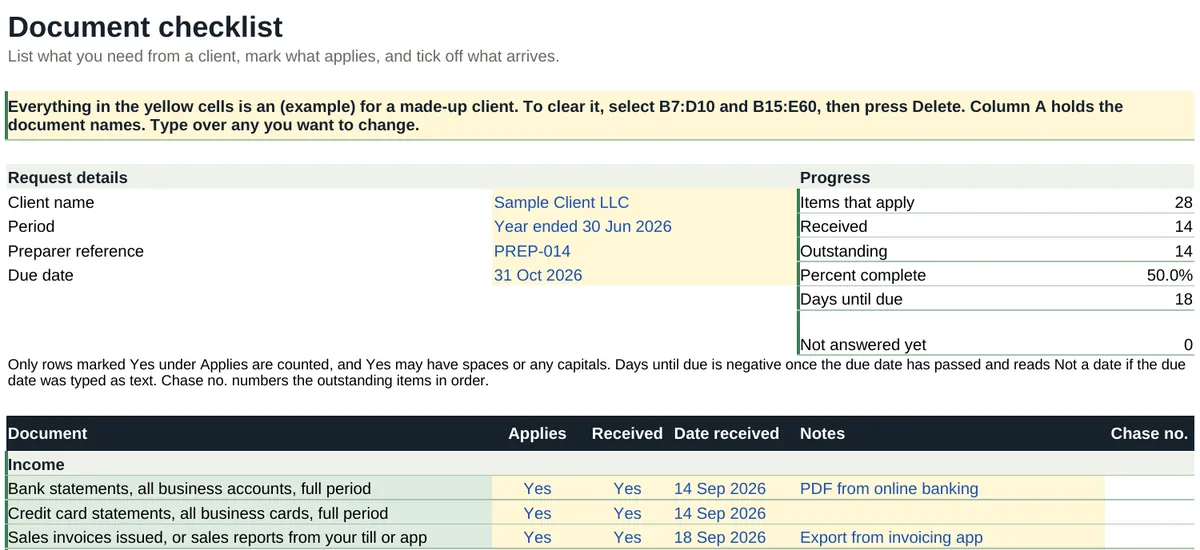
What's inside
Two tabs: Start here, and one working tab called Document checklist, in four blocks.
| Tab and block | What it does |
|---|---|
| Start here | Setup steps, a color key and a guide to the working tab. |
| Document checklist: Request details | Client name, Period, Preparer reference and Due date. |
| Document checklist: Progress | Items that apply, Received, Outstanding, Percent complete and Days until due. |
| Document checklist: Checklist | 39 listed documents in five sections (Income, Expenses, Property, Vehicle, Other) and two blank rows for your own. Columns: Document, Applies (Yes, No or NA), Received (Yes or No), Date received, Notes and Chase no. |
| Document checklist: Still outstanding | The first 15 missing documents by name, with a count of any more. |
A look at the file
| Document | Applies | Received | Date received | Notes | Chase no. |
|---|---|---|---|---|---|
| Property | |||||
| Closing statement for any property bought or sold | No | ||||
| Rent received summary or tenant ledger for each rental property | Yes | Yes | 28 Sep 2026 | One property | |
| Year-end mortgage statement for each property | Yes | No | Bank says mid October | 7 | |
| Property tax bills | Yes | Yes | 28 Sep 2026 | ||
| Landlord insurance invoices | Yes | Yes | 28 Sep 2026 | ||
| Repair and maintenance invoices, by property | Yes | No | 8 | ||
| Invoices for improvements or major works | No | ||||
| Statements from your property manager | NA | Self-managed | |||
| Homeowner association or strata fee statements | NA |
Chase no. numbers the documents that apply and have not arrived, counting from the top of the whole list, so the two property documents still missing are numbers 7 and 8. Rows marked No or NA are not counted.
| Progress | Count |
|---|---|
| Items that apply | 28 |
| Received | 14 |
| Outstanding | 14 |
| Percent complete | 50.0% |
Format
- File
- 1 Excel workbook (.xlsx), 2 tabs
- Software
- Microsoft Excel. Designed to open in Google Sheets.
- Limits
- 41 checklist rows, two of them blank for your own document names. One client per file: save a copy for each. The sample client is marked (example) and clears in one step.
- Delivery
- Instant download after purchase. Nothing is shipped.
- Price
- US$4.99, one-time. No subscription.
What it does not do
- It does not say what a client must file or which documents the law requires. Edit the list to suit your work.
- Only rows marked Yes under Applies are counted.
- It does not email reminders, and it gives no tax, legal or accounting advice.
Questions
Which version of Excel do I need?
Excel 2010 or later on Windows, Excel 2016 or later on Mac, or Excel for the web. We checked every formula in this workbook against the version of Excel that first supported it: the newest thing it uses arrived in Excel 2007, so it needs no Microsoft 365 subscription. There is nothing in it that only newer Excel can run, such as XLOOKUP, LET, IFS or TEXTJOIN, and there are no macros or add-ons. Excel 2003 and earlier are not supported.
The totals look blank when I open it. What is wrong?
Nothing. Excel opens a downloaded file in Protected View and does not calculate until you click Enable Editing. The figures appear as soon as you do.
Does it work on a Mac?
Yes, in Excel for Mac. There are no macros, so nothing in the file is Windows-only. It is also designed to open in Google Sheets in a browser.
Can I use it in Google Sheets?
The workbook is made in Excel and designed to open in Google Sheets: upload it to Drive and open it with Google Sheets. It uses no macros, scripts or add-ons. If something does not work as described there, email hello@goodcolumns.com and we fix it or refund you.
Can I change the list of documents?
Yes. Two rows are left blank for your own document names, and you can type over any of the others. Only rows marked Yes under Applies are counted.
What if I want a refund?
No change-of-mind refunds on digital files. If a file is faulty or not as described, email hello@goodcolumns.com within 30 days and we fix it or refund you.
Is this tax, legal or financial advice?
No. The list is a general checklist. You decide what each client needs to give you, and the sheet only counts what you mark.
The small print
Good Columns templates help you organise records. They are not tax, legal, accounting or financial advice, are not endorsed by the IRS or any government body, and may not suit your situation. You are responsible for the figures you enter.
Licence: use within your own business; no resale or redistribution.
No change-of-mind refunds on digital files. If a file is faulty or not as described, we fix it or refund you.
Full terms: Terms and refunds.