
Products / Document Chase Kit
Know which clients still owe you documents, and which email to send next.
Regular price US$19.99 Launch price US$14.99
Word and Excel files, instant download
Buy on Gumroad, US$14.99Send the request list for the client type, log the request, and each morning the tracker tells you whose reminder is due and which of the four emails it is.
Who it's for
Tax preparers and bookkeepers who chase clients for documents by email every season.
If your practice software already sends reminders, the request lists and handout still apply; you can skip the tracker.
Read the guide: Email to ask a client for missing tax documents
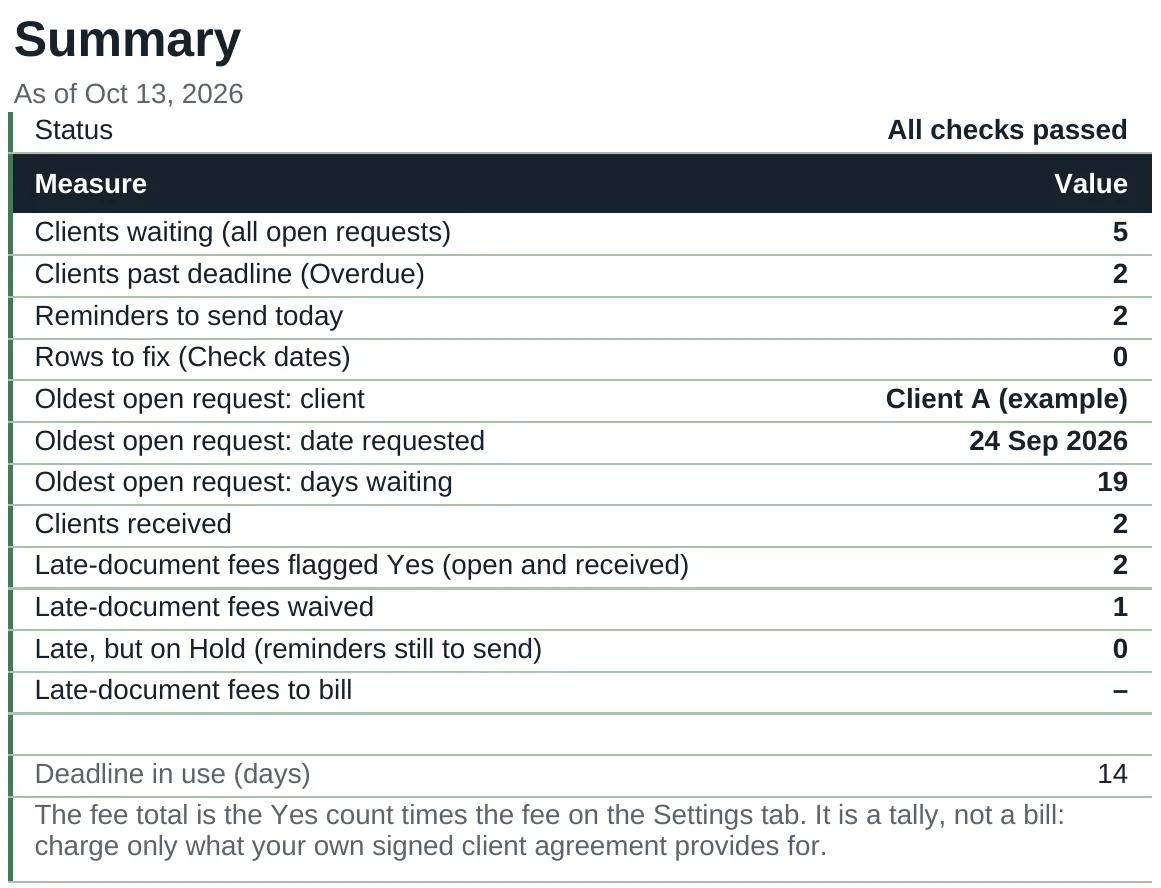
A look at the actual file
What's inside
Five files: four documents and one tracker workbook.
| File | What it is |
|---|---|
| READ-ME-FIRST.docx | What is in the kit and the order to use it in: before the season, for each client, each morning. |
| Document-Request-Lists.docx | Four one-page checklists for clients: sole proprietor (Schedule C), S corporation, rental property owner, independent contractor (1099). |
| Reminder-Email-Sequence.docx | Four emails with subject lines: friendly, firm, deadline, final notice. One per page, ready to paste. |
| Records-Policy-Client-Handout.docx | One page for clients: where to send records, formats you accept, what slows things down and your deadline. |
| Outstanding-Items-Tracker.xlsx | One row per client, up to 500. Counts the days, shows which reminder is due next, flags who is past your deadline and sorts open requests by days waiting. |
A look at the file
| Client | What is missing | Days waiting | Reminders sent | Next reminder | Send today? | Status |
|---|---|---|---|---|---|---|
| Client A (example) S-corp | Q4 Form 941, W-3, shareholder loan statement | 19 | 3 | 4 Final notice | Send now | Overdue |
| Client E (example) Sole proprietor | 1099-K, home office square footage | 16 | 4 | None left | Overdue | |
| Client B (example) Sole proprietor | Mileage log, December bank statement | 9 | 1 | 2 Firm | Send now | Waiting |
| Client C (example) Rental property owner | Form 1098, county property tax bill | 4 | 1 | 2 Firm | Not yet | Waiting |
| Client D (example) Contractor (1099) | 1099-NEC from two payers, Form 1095-A | 1 | 0 | 1 Friendly | Not yet | Waiting |
Open requests sorted by days waiting. The reminder days (3, 7, 11 and 15 after the request) and the deadline are set on the Settings tab, and match the four emails in the sequence.
Format
- File
- 4 Word documents (.docx) and 1 Excel workbook (.xlsx)
- Software
- Microsoft Word and Excel. Designed to open in Google Docs and Google Sheets.
- Limits
- The tracker holds 500 clients. Client-facing files carry no Good Columns branding; your firm name goes in.
- Delivery
- Instant download after purchase. Nothing is shipped.
- Price
- US$14.99, one-time. Launch price until 15 Nov, then US$19.99. No subscription.
What it does not do
- Engagement letters and client contracts are not included; use your professional body's template or your attorney.
- It does not hard-code any tax filing or extension due dates. Check the current IRS and state calendars each season.
- The request lists are general checklists. You decide what each client's return needs.
Questions
Which software do I need?
Microsoft Word for the four documents and Excel 2010 or later for the tracker. The files are also designed to open in Google Docs and Google Sheets. The tracker uses ordinary functions and no macros.
Does it work on a Mac?
Yes, in Word and Excel for Mac. The files are also designed to open in Google Docs and Google Sheets in a browser.
Can I use it in Google Docs and Sheets?
They are designed to open there: upload the files to Drive, then open them with Google Docs or Google Sheets. If the checkbox bullets on the request lists show a different symbol, change the bullet style to any box you like.
Can I use it in Google Sheets?
The workbook is made in Excel and designed to open in Google Sheets: upload it to Drive and open it with Google Sheets. It uses no macros, scripts or add-ons. If something does not work as described there, email hello@goodcolumns.com and we fix it or refund you.
What if I want a refund?
No change-of-mind refunds on digital files. If a file is faulty or not as described, email hello@goodcolumns.com within 30 days and we fix it or refund you.
Is this tax, legal or financial advice?
No. The request lists are general checklists and the emails are starting wording. You decide what each client's return needs, and anything about fees should come from your own signed client agreement.
The small print
Good Columns templates help you organise records. They are not tax, legal, accounting or financial advice, are not endorsed by the IRS or any government body, and may not suit your situation. You are responsible for the figures you enter.
Licence: use within your own business; no resale or redistribution.
No change-of-mind refunds on digital files. If a file is faulty or not as described, we fix it or refund you.
Full terms: Terms and refunds.